
|
|
More than just a doodle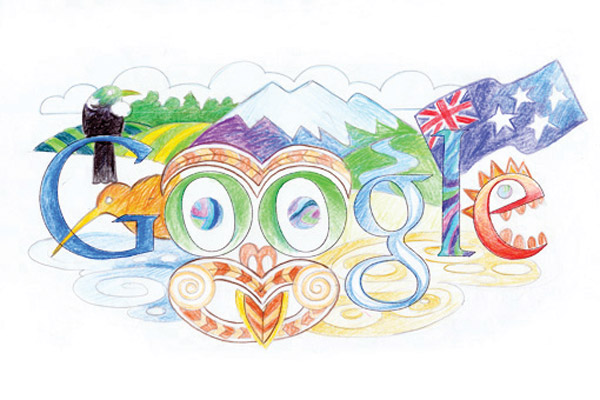 How does Google come up with their homepage doodles and why are we so taken by them? www.google.com logs approximately 2 billion searches daily and as a frequent user of this search engine, I for one appreciate the fact that this valuable web space is not cluttered with advertisements for Viagra or supposed lottery winnings. It is a welcome relief to be greeted by not only a distraction-free webpage but one that often keeps me guessing. Let’s be honest… how many of you can say you have never directed a co-worker to a newly discovered Google Doodle especially when it’s been interactive. Hands up if you were persuaded to shoot a few hoops or navigate a slalom canoe through an obstacle course during the Olympics. Doodles are the fun, surprising and sometimes spontaneous changes that are made to the Google logo to celebrate holidays, anniversaries and the lives of famous artists, pioneers and scientists. How did the idea for doodles originate? In 1998, before the company was even incorporated, the concept of the doodle was born when Google founders Larry and Sergey played with the corporate logo to indicate their attendance at the Burning Man festival in the Nevada desert. They placed a stick figure drawing behind the second "o" in the word Google, and the revised logo was intended as a comical message to Google users that the founders were "out of office". While the first doodle was relatively simple, the idea of decorating the company logo to celebrate notable events was born. Two years later, in 2000, Larry and Sergey asked current webmaster Dennis Hwang, an intern at the time, to produce a doodle for Bastille Day. It was so well received by our users that Dennis was appointed Google's chief doodler, and doodles started showing up more and more regularly on the Google homepage. In the beginning, the doodles mostly celebrated familiar holidays; nowadays, they highlight a wide array of events and anniversaries from the birthday of John James Audubon to the Ice Cream Sundae. Over time, the demand for doodles has risen in the US and internationally. Creating doodles is now the responsibility of a team of talented illustrators and engineers. How many doodles has Google done over the years? The team has created over 1,000 doodles for our homepages around the world. Who chooses what doodles will be created and how do you decide which events will receive doodles? A group of Googlers get together regularly to brainstorm and decide which events will be celebrated with a doodle. The ideas for the doodles come from numerous sources, including Googlers and Google users. The doodle selection process aims to celebrate interesting events and anniversaries that reflect Google's personality and love of innovation. Has New Zealand ever been featured in a Google Doodle? Yes. In 2011, youth from across New Zealand were invited to design their own doodle under the theme ‘My Wish for New Zealand’. Liam Platt from Ponsonby Primary won the competition with this doodle (INCLUDE PICTURE) How can Google users/the public submit ideas for doodles? The doodle team is always excited to hear ideas from users - they can email proposals@google.com with ideas for the next Google doodle. Nakita Ardern www.google.com/doodles Free programs Google offers that can help your business Maps Add a google map to your own website through the handy link tab. Simply type in your address and click on the (LINK) icon to receive a code that you can past into your website. http://maps.google.com/help/maps/getmaps/plot-one.html Youtube Use Youtube as a private video stash or upload clips to your own customised channel promoting your company. www.youtube.com Gmail Gmail works on any computer or mobile device with a data connection and offline support enables you to keep working even when you’re disconnected. 25GB of storage means you never have to delete anything, powerful search lets you find everything, and labels and filters help you stay organized. Text, voice, and video chat lets you see who’s online and connect instantly. www.gmail.com Google docs With Google docs you can create documents, spreadsheets and presentations, upload your existing work to view, and share and edit online. Your docs are stored on the web, so sharing them can be as easy as sending a link. You can make your documents as public or as private as you like and control who can view, comment on and edit each document at any time. Google docs is designed for teams. Multiple people can edit a document at the same time and integrated chat and commenting make it easy to work together. docs.google.com Calender Organize your day with Calendar and get event reminders on your phone or in your inbox. Attach files or docs to your event so you have the right materials when your meeting starts. Calendar sharing makes it easy to find time with the people you work with and the smart scheduling feature suggests meeting times that work for everyone. Create an event calendar and embed it on your website or set up appointment slots so customers can choose the best time for them. www.google.com/calendar Google Analytics Google Analytics not only allows you to measure sales and conversions, but also gives you fresh insights into how visitors use your site, how they arrived on your site, and how you can keep them coming back. www.google.com/analytics Blogger A blog is; a personal diary, a daily pulpit, a collaborative space, a political soapbox, a breaking-news outlet, a collection of links, your own private thoughts, memos to the world. Your blog is whatever you want it to be. There are millions of them, in all shapes and sizes, and there are no real rules. www.blogger.com Google Drive Google Drive is everywhere you are - on the web, in your home, at the office and on the go. So wherever you are, your stuff is just there ready to go, ready to share. Get started with 5 GB free. drive.google.com |
|
|

|